36 Back to School Icons: A Versatile Toolkit for Educational Design
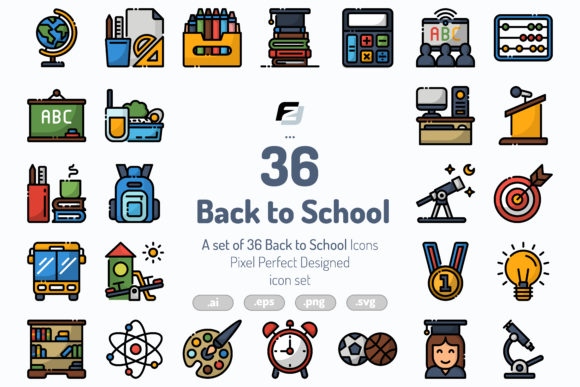
There is something about the back-to-school season that calls for clarity, energy, and a touch of organization. Whether you are a teacher setting up a classroom, a parent helping a child prepare, or a designer creating materials for a school district, you quickly realize how much visual communication matters. That is where a solid set of icons can make all the difference. The 36 Back to School Icons pack offers exactly that kind of support, but it goes further than just a handful of images. With 72 icons total, split across two distinct styles, this collection gives you room to work, adapt, and create without running out of options.
What stands out first is the dual-style approach. You get 36 outline icons and 36 colorline versions. That means you are not stuck choosing between a clean minimalist look and something more vibrant. You get both. So when you need a subtle visual for a black-and-white handout or a bold graphic for a digital banner, you have it ready. The icons are built on a 64px grid with pixel-perfect precision, which sounds technical but really just means they look sharp and consistent no matter where you place them.
Who Actually Reaches for a Back-to-School Icon Set?
You might assume these icons are only for teachers or school administrators, but the reality is broader. Think about anyone who needs to communicate ideas related to learning, organization, or preparation. Here are a few people who find themselves using this pack regularly.
Classroom Teachers and Educators
A teacher preparing a welcome packet for students might need icons for books, pencils, clocks, and backpacks. The outline style works beautifully on printed worksheets because it does not overwhelm the page. When that same teacher builds a digital slideshow for open house night, switching to the colorline version adds warmth and energy without looking cluttered. Having both styles available means the visual language stays consistent across printed and digital materials.
School Administrators and Office Staff
School newsletters, hallway signs, and event flyers all benefit from clear icons. A principal announcing a back-to-school night can use a calendar icon paired with a school building icon to quickly communicate time and place. The colorline versions help these signs stand out in busy hallways where people are walking past quickly. Since the icons come in multiple file formats, staff members with varying design experience can open them in Adobe Illustrator or drop the PNG files directly into a document.
Freelance Designers and Marketing Professionals
If you design for educational clients, you know how repetitive it can feel to search for the right icon every time you start a new project. Having a dedicated set of 72 back-to-school icons saves hours of browsing. You can use the outline versions for web interfaces and the colorline versions for social media graphics. The SVG files are especially handy for responsive websites where vector scalability matters.
Parents Helping at School or in the Community
Parent volunteers often find themselves creating flyers for bake sales, book fairs, or volunteer sign-ups. A simple pencil or apple icon makes those materials look polished without requiring design skills. The PNG files come in four sizes, so you can pick exactly what fits your layout without distorting the image.
Real-World Scenarios Where These Icons Shine
Icons are most useful when they solve a real problem or save you from reinventing the wheel. Here are some situations where the 36 Back to School Icons pack proves its worth.
Building a School Website from Scratch
A small private school or a parent-teacher association might decide to update their website before the new school year. Navigation menus, service pages, and event listings all benefit from consistent iconography. The outline icons work well for menu items because they stay readable at small sizes. The colorline versions can highlight key announcements on the homepage. Because the icons share the same grid base, they look cohesive even when you mix styles.
Creating a Classroom Supply List
Every year, teachers hand out supply lists that parents need to follow. Adding icons next to each item makes the list easier to scan. A scissors icon next to "safety scissors," a glue bottle icon next to "glue sticks," and a notebook icon next to "composition books" helps parents quickly find what they need, especially when shopping with children. The outline icons keep the list clean and printable in black and white.
Designing Social Media Campaigns for School Events
Social media managers for school districts or educational nonprofits often need fresh graphics for each event. A spirit week announcement can use a backpack icon combined with a clock icon to show the timeframe. The colorline versions pop against dark backgrounds, making them ideal for Instagram stories or Facebook posts. Since the pack includes SVG files, you can easily recolor elements to match your school colors.
Preparing Educational Handouts for Students
Teachers who create their own worksheets appreciate icons that break up text and guide the eye. A bell icon signals the start of a new section, a book icon marks reading time, and a pencil icon indicates a writing activity. The grid-based design ensures that icons line up neatly with text boxes and borders, so your layout stays tidy without extra tweaking.
How Different Users Benefit in Their Own Way
The beauty of a well-designed icon set is that it adapts to your workflow rather than forcing you to adapt to it. Here is how different users get value from this pack.
Designers Who Value Control
If you are comfortable with vector software, the AI and EPS files give you full control over stroke weight, color, and scale. You can open the outline icons and adjust the stroke thickness to match your branding. The editable stroke weight means you are not stuck with a preset thickness. This flexibility matters when you are designing for both print and digital and need the icons to feel consistent across mediums.
Non-Designers Who Need Simplicity
Not everyone has the time or interest to learn vector editing. For those users, the PNG files in four sizes are a direct solution. You can drop a 64px or 128px icon into a document, presentation, or flyer without any extra steps. The fact that the icons are already isolated means you do not have to worry about background colors clashing with your design.
Teams Working Across Platforms
When you collaborate with colleagues who use different software, file format compatibility becomes critical. This pack includes AI, EPS, SVG, and PNG, so whether your team works in Illustrator, Canva, Figma, or even Microsoft Office, there is a format that works. The SVG files are particularly useful for web developers who need lightweight, scalable graphics that look crisp on retina displays.
What to Consider Before You Start Using the Icons
Even a great icon set works best when you keep a few things in mind. Here are some observations from people who have used similar packs in real projects.
Match the Style to Your Medium
The outline icons work well for print materials, wireframes, and minimalist designs. The colorline versions are better suited for digital screens, social media, and situations where you want a bit more visual energy. If you are designing a document that will be printed in grayscale, test the colorline icons first, as some of the color contrast may not translate well to black and white. In that case, the outline style is usually the safer choice.
Consider Consistency Across Your Project
Once you pick a style for a project, try to stick with it. Mixing outline and colorline icons on the same page can feel chaotic unless you are intentionally using color as a highlight. That said, the pack gives you the freedom to choose, so you can always use the outline set for body content and the colorline set for headers or call-to-action buttons.
Scalability Is Handy, but Check the Details
The 64px grid ensures that icons scale cleanly, but when you blow them up very large, you might notice fine details that look different at smaller sizes. For most uses, the icons hold up well. If you are using them in a large poster or banner, it is worth previewing them at that size to make sure the simpler shapes still read clearly.
File Formats Matter for Your Workflow
If you work primarily in Canva or similar browser-based tools, the PNG and SVG files will be your go-to. If you use Adobe Illustrator, the AI and EPS files give you full editability. Knowing which format you need ahead of time saves you from having to convert files later. The pack covers the most common formats, so you are unlikely to run into compatibility issues.
Strengths That Make This Pack Stand Out
There are plenty of icon sets available, but a few things make the 36 Back to School Icons collection worth considering. The dual-style approach is the most obvious strength. Having both outline and colorline versions means you are prepared for almost any project without needing a second set. The pixel-perfect grid also reduces the time you spend aligning and adjusting icons, especially if you are a designer who values precision.
The variety of file formats is another practical advantage. Whether you are a solo creator or part of a larger team, you can work in your preferred environment without friction. The fact that the icons come in four PNG sizes also saves you from manually resizing and exporting images, which is a small but real time-saver.
Potential Limitations to Keep in Mind
No product is perfect for every situation, and this pack is no exception. The icons focus on school-related themes, so if your project needs symbols unrelated to education, you will need to look elsewhere. Also, while the colorline versions are vibrant, they follow a specific color palette. If you need icons in custom colors, you will want to use the AI or EPS files to adjust them, which requires some software knowledge.
For users who prefer heavily detailed icons, the simpler style of these designs might feel too minimal. However, that simplicity is exactly what makes them work well at small sizes and across different applications. It is a trade-off, but one that works in favor of versatility.
Whether you are organizing a classroom, launching a school website, or designing materials for an educational event, having a reliable set of icons removes a lot of friction from the creative process. The 36 Back to School Icons pack gives you both breadth and flexibility, so you can focus more on your message and less on hunting for the right graphic.