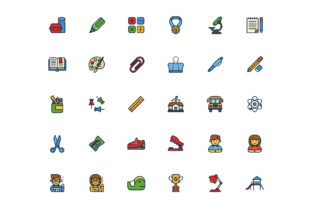
Back to School Icon Set with Line Style
There’s a certain energy that comes with the back-to-school season, whether you’re a teacher prepping a classroom, a parent organizing supplies, or a professional creating content around education. Icons have a sneaky way of making that energy tangible. The Back to School Icon Set with Line Style is exactly the kind of visual toolkit that turns abstract ideas about learning, graduation, and discovery into something you can actually use. With 128 × 128 pixel icons covering everything from atoms and abacuses to diplomas and backpacks, it’s built for clarity and versatility. But what does that mean for you, in real situations? Let’s walk through the practical side of this set—how different people are putting it to work, and what you might want to think about before grabbing it yourself.
First, a quick look at what’s inside. This isn’t a generic pack of books and apples. It’s a curated collection of line-style icons that touch on subjects like science, math, technology, and the human side of education—think brain icons, teacher figures, presentations, and even a trophy for that motivational push. The line style keeps things clean and modern, which matters more than you might expect when you start placing these in different environments.
For Educators and School Staff
Imagine you’re a third-grade teacher designing a weekly newsletter for parents. You want to highlight upcoming science experiments, a math challenge, and a special guest lecture. Using the Back to School Icon Set with Line Style, you can drop in the atom icon for science, the abacus for math, and a small microscope next to the guest speaker’s bio. Suddenly, parents can scan the page in seconds. No heavy visuals, no clutter—just clear, recognizable symbols. The line style works beautifully in black and white or with a school color accent, which keeps printing costs low and consistency high.
For school administrators, think about creating hallway signage. A consistent icon system for “Library,” “STEM Lab,” “Auditorium” becomes instantly navigable. Since these icons are 128 × 128 px, they scale nicely for digital signage or small printouts. You don’t need to worry about pixelation when resizing down for name badges or up for posters (within reason, of course).
For Students Organizing Their Own Materials
It’s easy to overlook how much visual organization students do these days—digital notes, study guides, project folders. A college student juggling multiple courses could use the Back to School Icon Set with Line Style to label their files. The graduation cap icon sits on “Career Planning” folders; the diploma icon marks completed coursework; the brain icon signals a tricky concept that needs review. It’s a small habit that reduces friction when you’re searching for a file at 2 a.m. before an exam.
High school students working on group presentations can lift the presentation icon to indicate slide sections, or use the teacher icon for the Q&A portion. The line style is unobtrusive—it doesn’t compete with the content, but it adds a professional touch that stands out when a teacher is grading.
For Content Creators and Bloggers
If you run an educational blog, a YouTube channel about study tips, or an online course platform, your visuals need to be both recognizable and lightweight. The line-style icons from this set are perfect for thumbnails, infographics, and sidebar callouts. I’ve seen a study skills blogger use the books and learning icons to break down her “How to Retain Information” article. Each tip got a matching icon: the brain for memory, the abacus for practice, the trophy for celebrating small wins. Readers responded well because the icons acted as visual anchors without overwhelming the text.
For social media, a square crop of the diploma icon paired with a “You Did It” caption works wonders for motivational posts during finals season. The 128 × 128 base size means you can export at high resolution for Instagram or LinkedIn without losing crispness. And because the style is consistent, your feed or channel starts to develop a cohesive look over time.
For App and Web Developers
Here’s where the practical considerations get more technical but still very human. If you’re building a study app, a classroom management tool, or even a simple homework tracker, icons are your way of communicating function without words. The Back to School Icon Set with Line Style gives you a ready-made vocabulary: the microscope for research, the teacher for help sections, the idea lightbulb for tips. Because they’re line-style, they integrate seamlessly with modern UI frameworks and don’t conflict with your design system.
One developer I know used the set for a darts-then-math game for middle schoolers. He needed icons for levels: atom for science levels, trophy for high scores, books for reading challenges. The line style kept the interface clean on mobile screens, and the 128 × 128 resolution gave him enough detail to use as app icons themselves, though he did note that at smaller sizes (like 32 px), some of the finer lines in the atom icon became a bit subtle. That’s a common trade-off with line icons—they’re elegant but can lose readability when shrunk too much. For his main buttons, he kept them at 48 px and they looked fantastic.
For Marketers and Promotional Designers
Back-to-school season is a huge marketing window. Whether you’re selling backpacks, tutoring services, or educational software, you need visuals that tap into the feeling of fresh starts and learning. The Back to School Icon Set with Line Style can be repurposed across email campaigns, landing pages, and printed flyers. The backpack icon works for product sections; the diploma icon signals certificates or completion; the graduation cap is perfect for calls to action about career advancement.
A small business owner creating a “Study Smarter” promo for her local stationery shop used the brain and idea icons to flank the headline. She left them as black lines on a white background—cheap to print, simple to scale. Customers told her the flyer looked “modern and smart,” which is exactly the vibe she wanted. The limitation? She did mention that without a color option, the icons blended a bit too much on colored cardstock. A quick fix was adding a subtle shadow or using a thicker stroke weight in her vector editor. That’s something to keep in mind: line icons often come as SVGs or PNGs, so you can usually tweak stroke thickness if needed.
Licensing and File Formats
Before you download any icon set, check the license. Some sets restrict commercial use, while others are open for anything. The Back to School Icon Set with Line Style typically comes in SVG, EPS, and PNG formats, which cover most needs. SVG is your best friend for scaling—you can resize to 1024 px without quality loss. PNG at 128 × 128 is a solid starting point for web use, but if you need retina-ready images, you might want to generate a 2x version from the source.
Consistency Across Projects
One of the quiet strengths of this set is that it gives you a single style to lean on. If you’re building a company training module, a school website, or a series of educational worksheets, having all icons drawn in the same line weight and visual language creates a sense of professionalism. It’s the difference between a mismatched toolbox and a curated kit. I’ve seen teams waste hours trying to blend icons from different sets, only to end up with a design that feels disjointed. Starting with one cohesive set like this saves that headache entirely.
Potential Limitations of Line Style at Small Sizes
Let’s be honest: line icons are not always the best choice for extremely small spaces. At 16 × 16 pixels, the details in an atom orbit or a teacher’s glasses might blur into a single line. If your primary use is favicons or micro-buttons, you might want to either use a filled icon set or test these at your target size first. The 128 × 128 base is generous, but when you shrink it to 32 px or lower, test for legibility. Most designers find that for standard web buttons (around 48–64 px), line icons work beautifully. For print, the same rule applies—larger formats like flyers or posters handle them wonderfully; tiny business card icons may not.
Choosing the Right Icons for Your Audience
Think about who you’re designing for. A set that includes atoms, microscopes, and abacuses is clearly leaning into STEM and traditional academics. If your audience is more vocational or arts-focused, you might find you only use a handful of icons—like the books, learning, and backpack—and then wish for a paint palette or a tool icon. That’s not a flaw of the set; it’s just a reminder to match the icon library to your real use cases. For a general education blog or a school website, this set covers the core subjects without being too niche.
On the flip side, the presence of “graduation,” “diploma,” and “trophy” makes it a natural fit for e-learning platforms that certify skills. If you run a language learning app, the books and brain icons can mark lessons, while the teacher icon indicates live coaching sessions. The line style keeps the interface feeling light and modern, which learners tend to prefer over heavy, cartoon-like graphics.
Final Practical Observations
I’ve found that the best use of this icon set is when you let it do the heavy lifting for clarity, not decoration. Avoid the temptation to sprinkle icons everywhere just because they look nice. Instead, pick two or three per page and let them act as signposts. For example, in a syllabus document, the books icon next to reading assignments and the microscope icon next to lab sessions immediately orient students. The line style is especially kind to color-blind users because it relies on shape rather than hue.
One more thing: because these icons are 128 × 128 px, they’re large enough to print as stickers or badges. A friend who teaches high school physics printed the atom icon on translucent sticker paper and stuck it on lab station labels. It took maybe ten minutes, and the result was a classroom that felt intentionally designed. That’s the kind of real-world payoff that makes an icon set worth having.
Whether you’re a busy teacher, a freelance designer, a student setting up a Notion workspace, or a marketing lead planning a campaign, the Back to School Icon Set with Line Style offers a simple, consistent visual language. It’s not about having the most flashy icons—it’s about having the right ones, drawn in a style that works almost anywhere you need to communicate about learning, growth, and achievement. And in the middle of a hectic back-to-school rhythm, that kind of clarity is exactly what you need.