Back to School Line Icons: Practical Vector Graphics for Everyday Projects
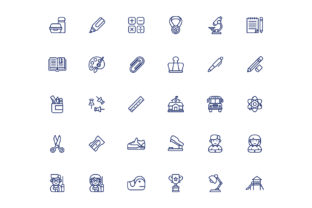
If you have spent any time looking for icons that actually work across different tools and formats, you know how frustrating it can be when a set looks good in the preview but falls apart the moment you try to use it. The Back to School Line icon set aims to solve that problem by offering 40 vector icons in three distinct styles: Line, Colorline, and Outline. These are not just another batch of generic symbols. They are built on a 64px grid, come in AI, EPS, SVG, and PNG formats, and include an Iconjar file for quick access. Whether you are designing a class schedule, building a learning app, or putting together marketing materials for a tutoring service, having icons that scale cleanly and match your aesthetic can save you hours of rework.
What Makes This Icon Set Different
The first thing you notice when you open the package is the thought that went into the file structure. You get an AI file, an EPS file, a heavy stroke file that is fully editable in Adobe Illustrator CS6 and above, and isolated PNG files in four sizes: 64px, 128px, 256px, and 512px. That means you are not stuck resizing raster images and hoping they stay crisp. The vector base lets you scale each icon up for a banner or down for a mobile interface without losing quality. For anyone who has tried to use free icon sets only to discover they are missing the SVG version or the stroke weight is inconsistent, this kind of completeness feels like a relief.
The three styles give you flexibility without forcing you to download three separate packs. The Line style works well for clean, minimal interfaces where you want subtle visual cues. The Colorline version adds a layer of personality with two-tone or colored strokes, which is useful when you need icons to stand out without becoming distracting. The Outline style fills the shapes, making them work better for buttons, badges, or situations where the icon needs to hold its own against a busy background. Having all three in one package means you can switch styles depending on the project without hunting for a different set.
Classroom Materials and Educational Resources
Teachers and educators often need to create handouts, slide decks, and digital assignments that feel engaging without looking cluttered. The Back to School Line icons cover common educational symbols: books, pencils, graduation caps, school buses, globes, and similar motifs. If you are a tutor building a website for your local business, you can use the Colorline style for subject tags like math, science, or reading. The icons become visual anchors that help parents and students quickly find what they need. A simple icon next to a course name reduces cognitive load and makes the page feel more organized.
For homeschooling parents, these icons work well in printable charts, daily schedules, or reward trackers. Because the PNG files come in multiple sizes, you can drop a 64px icon into a small sticker sheet and a 512px version onto a poster without any of that jagged edge look that cheap clip art gives you. The vector format also means you can change the stroke color to match your child’s favorite theme for the year, which is a small touch but one that makes a difference when you are trying to get a reluctant learner to engage with a chart.
Marketing and Promotional Materials for Education Businesses
If you run a tutoring center, an after-school program, or an online course platform, your marketing materials need to communicate trust and professionalism. Using inconsistent or low-quality icons can make even a well-designed flyer look amateurish. The Back to School Line set gives you a unified visual language. You can use the Line style for your website navigation, the Outline style for email newsletter buttons, and the Colorline style for social media posts. Because all the icons share the same grid and stroke logic, they feel cohesive even when used across different channels.
A real scenario: you are preparing a back-to-school campaign email. You need icons for registration, class schedules, pricing, and testimonials. Instead of pulling from four different sources that each have a different visual weight, you open the Iconjar file, drop the icons you need directly into your design software, and adjust the color to match your brand palette. The heavy stroke file makes it easy to tweak the thickness if your layout demands a bolder or lighter appearance. That kind of control is what separates a professional-looking email from one that looks thrown together.
Digital Products and App Interfaces
App developers and UI designers working on educational or productivity tools often need icons that are simple enough to read at small sizes but detailed enough to convey meaning clearly. The 64px grid ensures that each icon has consistent proportions, which matters when you are aligning them in a toolbar or a navigation menu. The SVG files are particularly useful here because they are lightweight and render natively in web and mobile interfaces. You can import them into Figma, Sketch, or XD and maintain editability.
Imagine you are building a student planner app. You need icons for homework, exams, reminders, grades, and notes. Using the Line style keeps the interface clean and modern. Because the icons are vector-based, you can adjust the stroke color dynamically based on the user’s theme preference. And if you later decide to add a dark mode, the same icons work because the outlines are distinct enough not to blend into the background. This is the kind of practical advantage that saves you from having to redesign your UI elements later.
Blog Graphics and Social Media Content
Bloggers and content creators in the education or parenting space often need visuals that reinforce their articles without distracting from the text. The Back to School Line icons can be used as bullet points, section dividers, or featured images for blog categories. A post about study tips, for example, can use a book icon as a visual cue next to each tip, making the content more scannable. On social media, the Colorline style works well for carousel posts where each slide introduces a different tip or product.
If you manage a Facebook group for teachers or a Pinterest board for classroom decor, having icons that are consistent makes your profile look curated. You can create a simple graphic with a quote overlaid on an icon, export it as a PNG, and schedule it for posting. The fact that the PNGs are already isolated means you do not have to spend time removing backgrounds or cleaning up edges. That is a small time-saver that adds up when you are producing content regularly.
File Formats and Compatibility
Before you commit to any icon set, it helps to check whether your tools can handle the formats provided. The AI and EPS files are compatible with Adobe Illustrator CS6 and above, which covers most professional vector editing workflows. If you use Affinity Designer or Inkscape, the SVG files will work well, though you may need to test the heavy stroke file for editability. The isolated PNG files are universal, so even if you only have basic image editing software, you can use them right away.
The Iconjar file is a nice addition if you use Iconjar as your icon management tool. It allows you to browse, search, and drag icons directly into your design software. If you do not use Iconjar, you are not missing out on anything essential, but it does add a layer of convenience for power users who manage large icon libraries.
When to Choose Each Style
The Line style is best for interfaces, wireframes, and situations where you want minimal visual noise. The Colorline style works well when you need a bit of visual interest but still want to keep the design clean, such as in infographics or presentation slides. The Outline style is ideal for printed materials, badges, and situations where the icon needs to be visible from a distance. Having all three means you can test each style against your actual layout and pick the one that feels right, rather than settling for something that is close but not quite there.
Customization and Brand Alignment
One of the strongest arguments for vector icons is the ability to customize them without starting from scratch. You can change the stroke color, adjust the line weight, or even combine elements from different icons to create something new. The heavy stroke file gives you extra flexibility because the strokes are already thick and editable, so you can thin them out if needed but you cannot easily thicken a file that started with thin lines. If your brand uses specific colors, you can apply them consistently across all 40 icons in minutes. That kind of coherence makes your materials look intentional rather than assembled from random assets.
Real Outcomes for Different Users
For a freelance instructional designer, having a reliable icon set means you can focus on the learning experience instead of hunting for visuals. You drop in an icon for each module, adjust the colors to match the client’s brand, and move on. For a small business owner running a bookstore that hosts workshops, these icons can be used in email newsletters, in-store signage, and social media announcements. The consistency across formats means your customers see the same visual language whether they are on your website or walking past your window.
For a hobbyist creating a digital bullet journal or a study tracker, the icons add a professional touch that makes your project feel finished. You can mix the Line and Colorline styles to create visual hierarchy, using simpler icons for recurring tasks and colored ones for special events. The grid-based sizing ensures that everything lines up neatly, which is especially important if you are printing or exporting to PDF.
The bottom line is that Back to School Line is not a flashy set meant to impress in a preview gallery. It is a practical collection of icons designed to work across the tools and formats that people actually use. Whether you are a teacher, a designer, a marketer, or someone making something for your own use, having icons that are consistent, scalable, and easy to edit makes a noticeable difference in how your final project looks and how much time you spend getting it there.