Back to School - Ruler: A Practical Vector Set for Real Projects
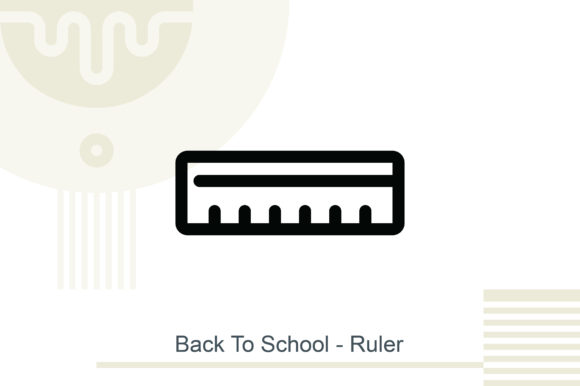
If you have ever scrambled to create a printable project and realized the artwork just does not hold up when you resize it, you already understand why working with vector files matters. Back to School - Ruler is a vector design set built around the classic ruler motif, and it is meant for people who need clean, scalable artwork that works across paper, screen, and product packaging. Whether you are putting together classroom materials, product labels, or marketing posters, this set gives you a starting point that actually behaves the way you expect.
What the Set Actually Includes
The package contains two file types that cover the most common workflow needs. You get a JPEG preview at 300 DPI, which is useful for quick mockups or when you just need to show a client something before the final output. The real work, though, happens inside the EPS10 file. Those are fully resizable vector files, which means you can scale the ruler design up for a banner or down for a sticker without losing sharpness or introducing pixelation. The files are 100% resizable, so you are not locked into one aspect ratio or size. If you have ever tried to enlarge a raster image of a ruler only to end up with jagged edges, you know exactly why this matters.
Who Benefits from Having This in Your Toolkit
A vector ruler set is one of those resources that seems simple until you realize how many ways you can apply it. The people who reach for this kind of file usually fall into a few overlapping groups, each with their own reasons.
Teachers and educators are the most obvious fit. If you create worksheets, classroom posters, or behavior charts, a ruler graphic can serve as a functional design element. You might use it to frame a weekly schedule, add measurement references to a math handout, or just reinforce the school theme visually. The fact that the files are vector means you can drop them into a document and resize them to fit whatever layout you are building without needing to edit the original artwork again.
Small business owners and product creators often need school-themed designs for seasonal packaging, promotions, or product labels. Think about a stationery brand launching a back-to-school collection, or a local coffee shop putting together a limited-time menu with classroom-inspired decor. A ruler vector works as a repeating border, a standalone graphic on a tag, or part of a larger collage. Because the file is EPS10, you can open it in most design software and treat it like native artwork.
Freelancers and designers who take on clients in education, publishing, or retail will find this useful for speeding up the initial concept phase. Instead of drawing a ruler from scratch for every project, you have a vector asset that you can customize, recolor, and combine with other elements. That saves time during the rough draft stage and gives clients something concrete to react to.
Hobbyists and home organizers might not think of themselves as the target audience, but a ruler vector is surprisingly handy for personal projects. If you are designing a family calendar, a chore chart, or even custom gift tags with a school theme, having a clean vector ruler means you can produce something that looks intentional rather than thrown together. The JPEG preview helps you test layouts quickly without opening a full design program.
Real Situations Where This Vector Set Works
The value of any design resource shows up best when you imagine the specific moment you actually reach for it. Here are a few scenarios that come up regularly.
You are a parent volunteering to help with a classroom party, and the teacher asks for a decoration set that fits the school theme. You open the EPS10 file, resize the ruler graphic to fit a banner, and print it on cardstock. Because the vector scales cleanly, the edges stay sharp even at a larger size. You add the students names along the ruler markings, and suddenly you have a personalized element that took minimal effort.
You run a small shop on Etsy that sells printable planners. The back-to-school season is your busiest time, and customers expect fresh designs. You take the ruler vector, change the color palette to match your brand, and use it as a divider page for a teacher planner. The 300 DPI JPEG preview lets you create a listing image that looks crisp on screen, while the EPS10 file gives customers a file they can edit themselves if they want to customize further.
You are a parent-teacher association volunteer putting together a welcome packet for new families. You need something that looks organized but does not require a design degree. The ruler graphic works as a neat border for the cover page. You import it into your word processor, resize it to fit the margins, and print. The whole process takes a few minutes instead of a few hours.
You are a content creator making social media graphics for a brand partnership with an office supply company. You need a visual that suggests measurement, precision, and school readiness without being literal. The ruler vector, scaled down and rotated slightly, works as a subtle background element. Because the file is vector, you can export it at any resolution without worrying about the final output looking fuzzy on Instagram or Pinterest.
Practical Considerations Before You Use It
Having a vector file is only helpful if you have the software to open it. EPS10 files work in Adobe Illustrator, CorelDRAW, Affinity Designer, and most other vector editing programs. If you are working in a simpler tool like Canva or Microsoft Word, you might need to convert the file or use the JPEG preview instead. Check your software compatibility before you plan a project that depends on editing the vector directly.
The 300 DPI JPEG preview is good for most screen use and decent for small prints, but if you are producing something at poster size or larger, you will want to use the EPS10 file. Vector files have no fixed resolution, so they can scale up to billboard size without loss. The JPEG, on the other hand, will eventually show pixelation if stretched too far.
Think about the color palette upfront. The ruler design in the set comes with its own default colors, but because it is vector, you can recolor it entirely. If you are building a cohesive brand kit or classroom theme, match the ruler colors to your existing palette before you start placing it across multiple files. That saves you from having to go back and adjust every instance later.
Consider licensing if you plan to use the design for commercial products. Vector sets often come with different usage terms, and while many allow commercial use, you should verify that you are allowed to sell printed items or digital files that incorporate the design. This is particularly relevant if you are a small business owner or Etsy seller who plans to offer finished products.
How Different Users Get Different Results
One of the strengths of a vector asset like this is that how you use it depends on what you need. A teacher might use it literally, keeping the ruler markings visible and using the design as a functional measuring reference on a worksheet. A designer might abstract it, cropping into just the edge of the ruler to create a geometric pattern or repeating motif. A business owner might use it as a decorative element on packaging, letting the school theme reinforce the seasonality of the product without making the packaging noisy.
The same file can produce very different results based on what you pair it with. Used alone on a plain background, the ruler graphic reads as clean and minimalist. Combined with other school-themed elements like pencils, apples, or chalkboards, it becomes part of a larger nostalgic scene. Your choice of colors and layout determines whether the final piece feels playful, serious, or instructional.
If you are someone who values speed, the JPEG preview will be your go-to for testing. If you value flexibility, the EPS10 file is where the real potential lives. Having both in one package means you can move between quick mockups and production-ready files without downloading separate assets or dealing with format conversions.
Final Thoughts on Making This Work for You
The best design resources are the ones that get out of your way. Back to School - Ruler is not trying to be a complete decorative system or a preset template. It is a clean, scalable vector element that you can drop into whatever project you are working on and adapt to your own needs. Whether you are preparing classroom materials, building a seasonal product line, or just trying to make a family calendar that does not look like an afterthought, having a reliable ruler graphic in vector format removes one more friction point from the creative process.
Pay attention to the details that matter for your specific use case. If print quality is important, lean on the EPS10 file and make sure your print setup matches the DPI requirements. If digital use is the priority, the JPEG preview at 300 DPI will serve you well on most screens. Test the file in your usual software before you start a time-sensitive project, and take advantage of the fact that vector files let you change colors, scale, and positioning without starting over.
A ruler might seem like a simple shape, but in the right context, it carries meaning around learning, precision, and structure. That is the kind of visual that works across many projects, and having it ready in a format that scales perfectly is what makes the difference between a project that looks put together and one that looks pieced together.