Hipster Logo Back to School Design
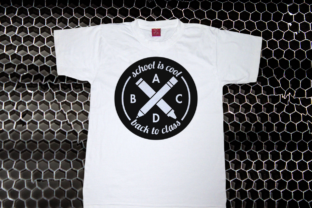
The start of a new school year brings a mix of emotions, but it also sparks a unique wave of creativity for makers, educators, and entrepreneurs. Enter the Hipster Logo Back to School design, a graphic that perfectly balances nostalgic schoolroom symbolism with a modern, minimalist edge. At first glance, you see the classic X formation of a pencil and a crayon, crossed like a promise of fun learning. Encircling this core are encouraging phrases like "School is Cool" and "Back to Class," anchored by a bold ABCD. It’s a design that feels both timeless and freshly relevant. But depending on whether you are cutting vinyl for a lunchbox, printing flyers for a classroom, or launching a small batch of seasonal merchandise, this SVG bundle offers very different kinds of value. Let’s break down what this design is, why it matters across different creative and professional contexts, and how to choose the right file format for your specific project.
What Exactly Is the Hipster Logo Back to School Bundle?
This design is more than just a pretty picture; it is a versatile digital asset delivered in a suite of formats tailored for different machines and software. The "hipster" aesthetic here refers to a clean, hand-drawn line style that feels authentic rather than overly corporate. The circle layout makes it perfect for patches, stickers, and central placement on apparel. You will typically receive SVG, PNG, DXF, and EPS files in the bundle. SVG works seamlessly with Cricut Design Space, Silhouette Studio, and Brother ScanNCut. DXF is ideal for Graphtec and other professional cutting machines. EPS is the go-to for vector editing in Adobe Illustrator or CorelDRAW. PNG provides a raster preview for mockups or quick print projects.
Designed to be effective in one, two, or multiple colors, this bundle gives you direct control over material costs and project complexity. A single-color version in gold or white is elegant and easy to weed. A two-color version can make the pencil and crayon pop against the circle. A full-color version turns the graphic into a vibrant print-ready illustration. Understanding these format and color options is the first step to matching the design to your own skill level and output goals.
Audience Perspectives: What Does This Design Mean for You?
Different people purchase this design for different reasons. Instead of a one-size-fits-all description, let's look at how specific audiences interact with the bundle.
For the DIY Parent and Weekend Hobbyist
Your priority is usually ease of use and a guaranteed "cool" factor to impress your kids or their friends. You do not want to spend hours adjusting nodes in design software. You want a project that goes from download to finished product in a single evening.
Practical example: You have a Cricut Maker. You want to make a "First Day of School" shirt for your kindergartener. Dragging the SVG file into Design Space, resizing it to fit a tee, and cutting it from iron-on vinyl is a one-hour project. The built-in circle border makes it look like a professional patch without any sewing. The "School is Cool" message serves as gentle, positive reinforcement for a nervous child. The SVG format handles all the line paths for you, meaning you get clean cuts without fiddling with nodes.
Key priorities: Speed, immediate results, easy weeding, and a design that works out of the box. You value reliability over extreme customization.
For the Teacher or Room Parent
Your focus is on engagement, decoration, and durability. You might need multiple copies or larger sizes for bulletin boards, door decorations, or classroom labels. The clarity of the text and the message matters because it sets the tone for your learning environment.
Practical example: You are decorating your classroom door for the first week of school. You can use the EPS or SVG file to size the design to 18 inches wide and cut it from cardstock or adhesive vinyl using your school's Silhouette or Cricut. The thick lines of the pencil and crayon hold up well at scale. You could also print the PNG version on sticker paper to create "cool" badges for your students on the first day. The positive messaging reinforces your classroom culture right from the entrance.
Key priorities: Scalability without losing detail, clear and readable text at a distance, positive messaging, and the flexibility to create non-apparel items like signs and labels.
For the Small Business Owner and Creator
Your primary driver is commercial viability. How easily does this design translate into a product that sells? Back-to-school season is a massive sales window for t-shirts, tumblers, and tote bags. You need a design that is trendy but not overly complex to manufacture in small batches.
Practical example: You run a small online shop. You need a design that works well across different products. The SVG allows you to set up cut lines for layered heat transfer vinyl. You can offer the design in three colorways—all gold, pink and blue, or white—to appeal to different tastes. The DXF file is useful if you have a larger format cutter for bulk decal production. The unisex appeal of the hipster style means it works for both boys and girls, expanding your target market without needing two separate designs.
Key priorities: Commercial potential, ease of production in small runs, professional output quality, and vector file compatibility across different cutting machines.
For the Graphic Designer or Advanced Maker
You want to remix, refine, or adapt the asset. The base design is a starting point, and you see its potential to become something entirely different. You care about the structural quality of the vectors and the licensing terms.
Practical example: You receive the EPS file and open it in Illustrator. You decide to swap the font used for "Back to Class" to better match your brand. You modify the crayon into a paintbrush to fit an art-themed project. You extract the central ABCD monogram and turn it into a standalone logo for a tutoring business. The clean, closed vector paths allow for high-level editing without pixelation or broken lines.
Key priorities: Full editability of the EPS or SVG file, clean and well-organized vector layers, adherence to professional standards, and the flexibility to create derivative works.
Navigating the File Formats: A Practical Guide
Choosing the wrong file format can lead to wasted time and frustration. Here is a no-nonsense breakdown based on your specific output goal.
- For vinyl cutting like t-shirts, decals, or tumblers, use the SVG file. It works with Cricut Design Space, Silhouette Studio, and Brother ScanNCut. If you are using a Graphtec or a Cameo with auto-blade, the DXF file is often preferred. Both formats preserve the vector paths, giving you crisp, clean cut lines. Remember that a multi-color design requires layering, which the SVG makes easy if the design is properly grouped by color.
- For digital mockups and social media, use the PNG file. The transparent background allows you to overlay the design onto a mockup photo of a t-shirt or coffee mug in seconds. This is ideal for marketers, bloggers, and Etsy sellers who need to showcase the design quickly without cutting physical product first.
- For high-end editing and print production, use the EPS file. It is the industry standard for vector editing in Adobe Illustrator. You have full control over anchor points, fills, and strokes. Professional print shops often prefer EPS for screen printing separations.
- For quick print projects like stickers, cardstock decorations, or sublimation transfers, the PNG file works perfectly. Just insert it into a document or print directly from your design software.
Is This Design Right for Your Project?
This comes down to matching the design's strengths with your specific constraints and goals. Reflect on how you work best.
Consider your skill level. If you are brand new to cutting machines, the SVG file is your best friend. It requires the least technical know-how. Simply upload, ungroup, size, and cut. If you are a seasoned professional, the value lies in the EPS file and the ability to modify every single element. Both the beginner and the pro can use the same bundle and achieve satisfying results, just through different workflows.
Consider your audience. The hipster aesthetic works incredibly well for modern, urban families, trendy boutiques, and millennial parents. It might feel out of place in a very formal or traditional school setting. If your audience values clean, simple, and slightly retro design, this is a strong match.
Consider the scale of your project. Are you making one gift for your niece, or fifty shirts for a PTA fundraiser? The SVG is perfect for singles and small batches. If you are doing mass production, the DXF or EPS files, combined with a production cutter or a screen printer, become the most efficient path forward.
Consider the cost versus the value. Vector designs like this usually cost a few dollars. The time you save compared to drawing it from scratch is immense. If you are a business owner, a single shirt sale recoups the cost. If you are a hobbyist, you save two or three hours of design time that you can instead spend on the enjoyable part: creating the finished product.
Making the Design Work for You
The Hipster Logo Back to School bundle is a perfect example of how a thoughtfully designed graphic can serve multiple masters. For the hobbyist, it is a gateway to a quick, satisfying weekend project. For the educator, it is a tool for connection and classroom spirit. For the entrepreneur, it is a low-risk, high-reward asset ready for the back-to-school rush.
The key is to look past the picture itself and see the potential workflows. Focus on the file formats. Identify your primary output goal—whether it is cut, print, or edit. Let the design's inherent charm do the heavy lifting of appealing to kids and parents alike. Whether you are weeding vinyl for the first time or checking color separations for a production run, this design invites you to make "School is Cool" your own.